Сloud Migration Checklist: Guide on How to Migrate an Application to the Cloud


 0 (0 reviews)

Cloud migration gives modern businesses faster innovation, greater flexibility, and smarter cost control. It’s a direct way to scale operations, streamline infrastructure, and respond to market changes without being limited by physical systems or outdated processes.
In this guide, you'll get a clear, practical breakdown of the entire application migration to cloud checklist.
Why Cloud Migration Matters for Modern Businesses
Key Business Benefits of Moving to the Cloud
Cloud migration turns infrastructure into a growth driver. Instead of overinvesting in hardware, businesses can scale on demand and pay only for what they use. This frees up capital, reduces financial risk, and supports smarter long-term planning.

Other benefits include:
- Faster deployment of new features;
- Real-time access to systems from any location;
- Automated backups and security patching;
- Easier disaster recovery;
- Seamless remote collaboration;
- Built-in scalability during demand spikes.
Risks of Staying On-Premises vs Cloud Migration
Keeping infrastructure fully on-premises slows growth and limits flexibility. Modern markets move fast, and legacy setups simply can’t keep up with rising performance and security demands.
Expert Opinion «Relying only on local infrastructure is a business risk. Cloud platforms provide resilience, geo-redundancy, and built-in disaster recovery — advantages that no traditional server room can match.»Oleksandr Prokopiev CEO of Artjoker

Top providers also simplify compliance and business continuity planning, especially in regulated industries such as healthcare, banking, and insurance.
Cloud Fundamentals: Deployment Models, Characteristics, and Service Layers
A clear understanding of cloud fundamentals helps shape migration decisions and align them with business objectives. Cloud platforms rely on flexible deployment models, consistent technical characteristics, and service layers that define how workloads run.
Cloud deployment models determine where applications operate:
- Public cloud — provider-managed, elastic infrastructure.
- Private cloud — isolated environment for stricter control and compliance.
- Hybrid cloud — a mix of both, keeping sensitive systems on-premises while scaling others in the cloud.
Across these models, clouds share five core characteristics: rapid self-service provisioning, broad network access, pooled resources, elastic scaling, and transparent usage-based metering.
Cloud adoption solves long-standing operational issues by reducing capital spending, improving resilience through geo-redundancy, simplifying updates, and removing dependence on a single physical facility.
Workloads run on three cloud service layers:
- IaaS (Infrastructure as a Service) — virtual machines, storage, and networks.
- PaaS (Platform as a Service) — managed runtimes for faster application delivery.
- SaaS (Software as a Service) — complete applications without infrastructure management.
Don’t Migrate Blind
We provide cloud migration plans that eliminate risk and downtime.
Get Migration PlanCloud Migration Checklist: Pre-Migration Planning
A successful transition starts with solid preparation. Here’s how to plan cloud migration before touching any systems:
- Assess your systems. Identify critical apps and remove those no longer needed.
- Set business goals. Define priorities like costs, uptime, or scalability to shape your cloud migration strategy.
- Check compliance requirements. Align with industry data and security standards.
- Estimate costs. Include licensing, training, downtime, and optimization.
- Select process types. Rehost, refactor, or rebuild based on system needs.
- Plan phases. Create a realistic migration timeline with minimal disruption.
- Assign ownership. Define responsible teams and decision-makers for each stage.
Cloud Migration Checklist: Choosing the Right Cloud Provider
The right provider helps you achieve your business goals faster. Each platform offers unique strengths, and evaluating them against a clear cloud migration checklist ensures the choice supports your long-term strategy, infrastructure, and growth plans.
AWS, Azure, or Google Cloud — How to Decide?
Each provider has strong points. Our benefits review and comparison table below works as a quick cloud migration guide to help you evaluate their core advantages.

- AWS is widely used for its maturity and service depth. It’s ideal for companies that want a broad selection of tools, global reach, and developer flexibility.
- Azure integrates naturally with Microsoft tools like MS 365 and Entra ID. If you're already using Microsoft infrastructure, migrating applications to the cloud with Azure reduces friction.
- Google shines in AI, analytics, and open-source integration. Tech startups and data-heavy companies often choose it for advanced ML services and scalable APIs.
Comparing Features, Pricing, and Support
| Criteria | AWS | Azure | |
|---|---|---|---|
| Business Scalability | Proven at enterprise scale, global reach | Strong for corporate workloads, hybrid-ready | Flexible for modern apps and startups |
| Cost Control & Pricing Flexibility | Many savings options, complex billing | Good enterprise discounts, predictable with EA | Clean pricing, strong, sustained use discounts |
| Security & Compliance | Extensive compliance support, granular policies | Enterprise security, best for Microsoft policies | Strong security model, privacy reputation |
| Integration & Ecosystem | Largest partner network, broad stack | Best Windows/AD/Microsoft 365 integration | Great for APIs, Kubernetes-first companies |
| Data & AI Capabilities | Strong ML tools and analytics stack | Solid for enterprise BI, Azure AI services | Industry-leading analytics with BigQuery |
| Support & Reliability | Mature SLAs, wide support tiers | Strong enterprise support and guidance | Good support, improving enterprise coverage |
Hybrid and Multi-Cloud Considerations
Hybrid and multi-cloud models offer more control and flexibility. With a hybrid approach, some systems stay on-premises, while others move online — useful for sensitive data or gradual transitions.
A multi-cloud setup uses several providers at once. This spreads risk, avoids vendor lock-in, and boosts resilience, but it requires strong coordination across platforms to manage identity, security, and integrations.
Cloud Migration Checklist: Preparing Your Team and Data
Preparing for the process starts with a reliable technical foundation — clean data, documented dependencies, and clear integration points with existing systems. This preparation reduces risks during execution and prevents unexpected downtime.
Expert Opinion «Migration isn’t just a technical shift — it’s an operational change that succeeds only when people are aligned and involved.»Oleksandr Prokopiev CEO of Artjoker
The steps to migrate applications to the cloud always start with alignment across teams. That’s why it’s important to involve IT, security, finance, and operations early. Shared ownership and clear communication keep the process controlled, structured, and transparent.

How to Migrate Application to AWS: Step-by-Step Guide
A structured migration to AWS cloud starts with a clear understanding of the current environment. The initial assessment uses Migration Evaluator and AWS Application Discovery Service to capture dependencies, workloads, and performance baselines. Based on these findings, you select the migration strategy — rehost, replatform, or refactor — and design the target AWS architecture.
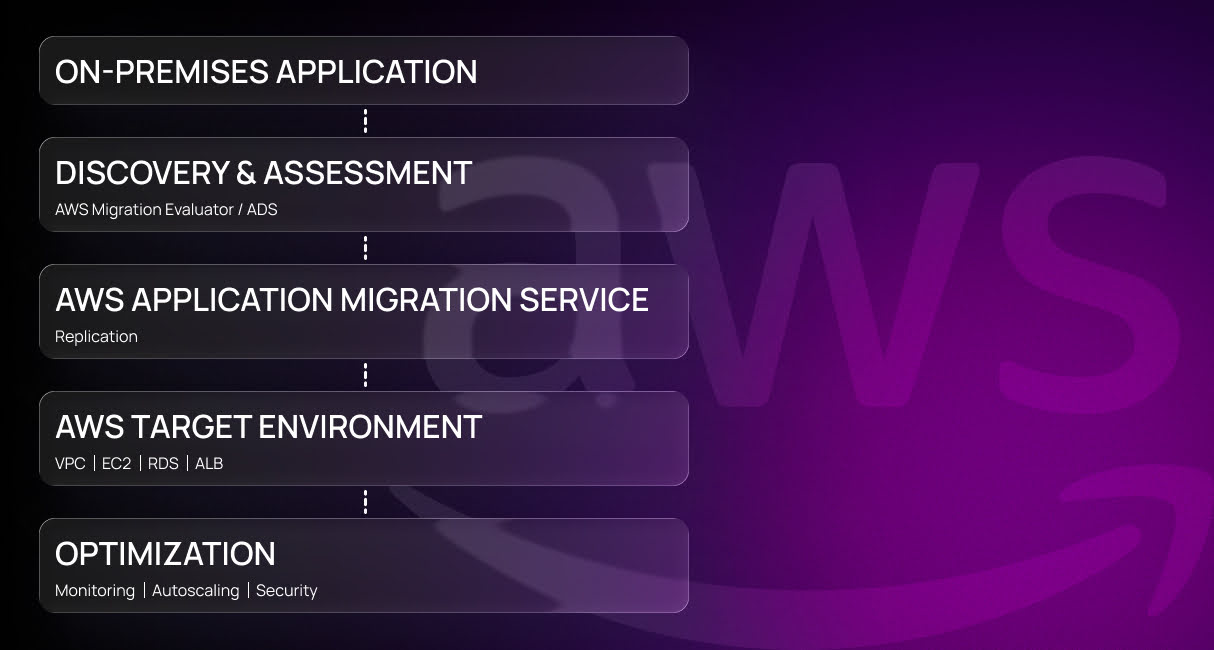
A typical process looks like this:
- Discovery & Assessment. Migration Evaluator and ADS help map the application, measure resource usage, and confirm readiness.
- Migration pattern definition. Rehost for speed, replatform for modest modernization, or refactor for deeper AWS-native integration.
- Workload replication. AWS Application Migration Service (or DMS for databases) performs continuous replication with minimal downtime.
- Deploying into the target AWS environment. VPC, EC2, RDS, and ALB form the base components, supported by IAM, subnets, and infrastructure-as-code templates.
- Optimizing and securing the system. Autoscaling, RDS tuning, Compute Optimizer, GuardDuty, Config, and WAF strengthen performance, resilience, and security.
This structure mirrors the AWS cloud migration checklist yet remains flexible for different workloads. When handled correctly, application migration from on premise to AWS cloud step by step results in predictable performance, lower operational overhead, and a foundation that scales with your business.
How to Migrate Application to Azure: Step-by-Step Guide
A successful migration enterprise application from on premise to Azure cloud begins with clear visibility into the current environment. Azure Migrate handles discovery and assessment, inventories servers and databases, maps dependencies, and estimates sizing and readiness. These insights define networking and Landing Zone architecture (VNets, NSGs, load balancers) and help determine the right migration model — VM lift-and-shift, App Service modernization, or an AKS refactor.
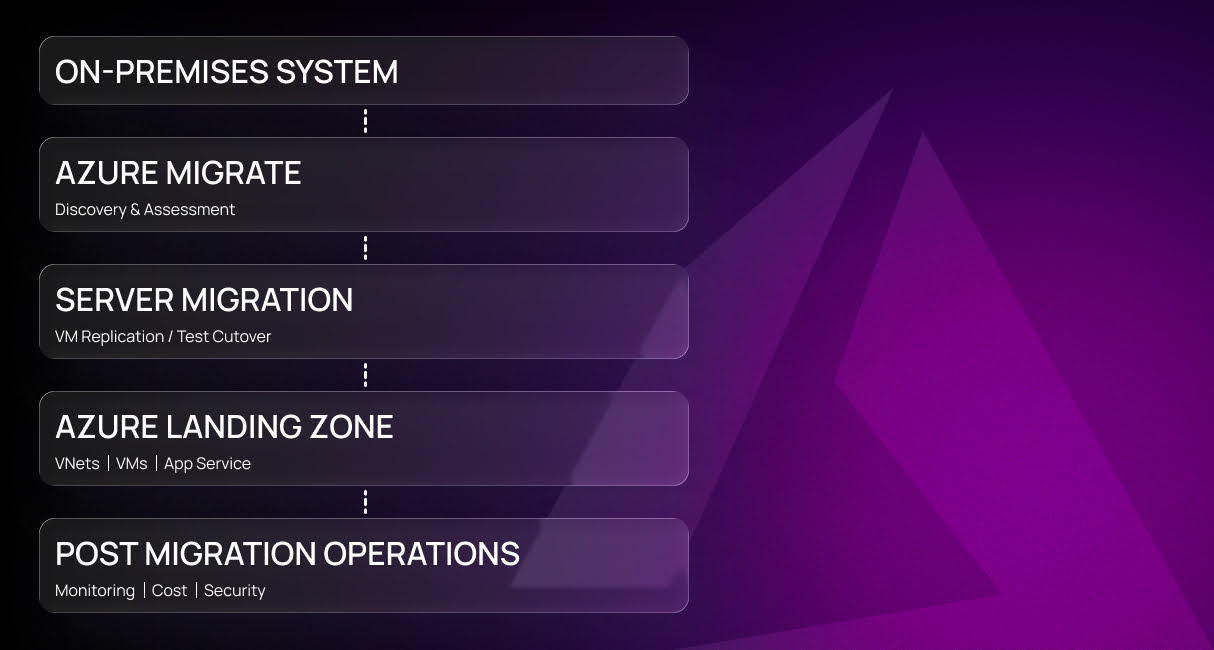
Following the Azure cloud migration checklist, the process usually unfolds as a series of coordinated phases:
- Discovery & Assessment. Azure Migrate scans the on-premises system, maps dependencies, and provides sizing and cost recommendations to support planning.
- Choosing the migration approach. Select between VM lift-and-shift, App Service-based modernization, or a container refactor using AKS, depending on long-term goals.
- Replicating and validating workloads. Server Migration replicates VMs to Azure, enabling test cutovers to verify behavior before committing to production cutover.
- Deploying into the Azure Landing Zone. VNets, VMs, App Service, identity, governance baselines, and policy controls form a structured target environment aligned with Azure best practices.
- Post-migration operations. Azure Monitor, Application Insights, and Cost Management support ongoing optimization, while Azure Defender, Key Vault, and Azure Policy reinforce security and compliance.
Handled as clear steps for cloud migration to Azure, this framework minimizes disruption, accelerates adoption, and ensures the migrated workloads operate reliably, efficiently, and securely from day one.
How to Migrate Application to Google Cloud: Step-by-Step Guide
A migration to Google Cloud starts with assessing legacy workloads through Google Cloud Migrate, which identifies VM utilization, dependency chains, and compliance requirements. These findings shape the VPC design, firewall rules, IAM setup, and the choice between lift-and-shift, GKE replatforming, or serverless modernization via Cloud Run or Cloud Functions, forming a clear foundation for a practical guide to cloud migration.
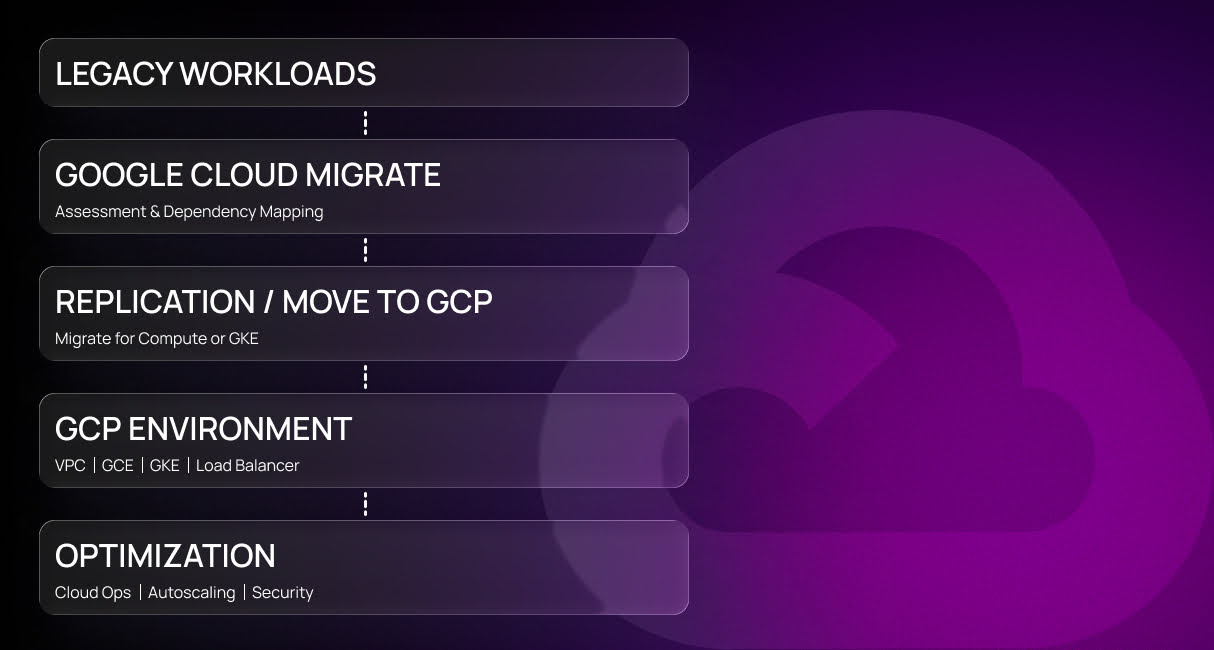
The process typically unfolds in the following sequence:
- Assessment & Dependency Mapping. Google Cloud Migrate analyzes workloads, identifies resource patterns, and maps services that must move together.
- Choosing the migration path. Select lift-and-shift via VM Migration, containerize into GKE, or modernize using serverless options like Cloud Run.
- Replicating and validating workloads. Migration tools replicate VMs or containers into isolated GCP environments, allowing performance and compatibility testing before cutover.
- Deploying into the target GCP environment. VPC, GCE, GKE, load balancers, and identity policies form the foundation of the new production architecture.
- Optimizing and securing operations. Cloud Operations Suite supports ongoing monitoring and tracing, while autoscaling, load balancing, committed use discounts, Cloud Armor, Secret Manager, and organization policies strengthen efficiency and security.
Executed as a controlled sequence, this Google cloud migration checklist reduces risk, accelerates adoption, and ensures that migrated workloads operate reliably, cost-efficiently, and securely from the moment they go live.
Post-Migration Checklist: What to Do After Moving to the Cloud
Going live opens the door to long-term gains. What you do next shapes the real impact and follows the same principles as any migrating apps to the cloud guide.
Monitor Performance and Costs
Use built-in dashboards to monitor CPU, memory, storage, and traffic in real time. Set alerts for unusual activity and review reports weekly.
Optimize as you go — resize overprovisioned instances, shut down idle services, and enable autoscaling. These small steps help control the cost of migrating to the cloud and keep systems efficient.
Implement Security Best Practices
Lock down your setup right after migration. Review all access rights, enforce strong identity controls, and encrypt data both in transit and at rest.
Use built-in tools like GuardDuty (AWS), Microsoft Defender (Azure), or Security Command Center (Google) to monitor threats. Limit public exposure, enable logging, and document key security actions. Application migration to the cloud best practices focus on preventing risks.
Plan for Continuous Optimization
Online environments perform best when they are continuously optimized. Regular reviews prevent waste, uncover performance bottlenecks, and keep costs under control as workloads grow.
Expert Opinion «Peak efficiency isn’t achieved at launch — it’s achieved through ongoing optimization. The teams that review, measure, and adjust regularly always get a better return on their investment.»Oleksandr Prokopiev CEO of Artjoker
Automation tools like autoscaling, serverless functions, and scheduled shutdowns reduce manual work while improving reliability. For deeper optimization, cloud migration consulting can provide targeted audits and growth-ready recommendations.
Common Cloud Migration Mistakes and How to Avoid Them
Even well-intentioned teams run into avoidable issues. Here are five to watch out for and how to sidestep them.

- Migrating everything at once. It sounds fast but rarely works. Rushing migrating to cloud computing steps increases the chance of failure.
- Skipping dependency mapping. One broken connection can crash multiple systems. Document services, APIs, and databases beforehand.
- Ignoring stakeholder communication. Teams must understand changes before rollout. Early buy-in leads to smoother adoption.
- Underestimating downtime risks. Plan cutover windows during low-traffic hours. Have rollback procedures ready.
- Overlooking reviews. Always test, tune, and validate. The job isn’t done at launch.
These issues delay value delivery and frustrate teams. Use these mistakes as 5 tips for a successful cloud migration to guide your planning. Review lessons learned. Adjust before scaling further.
Ready to Migrate? Here’s How Artjoker Can Help
Migrating to the cloud improves agility, cuts costs, and removes tech barriers to growth. But only when done right.

Artjoker provides cloud migration services that help companies move applications, data, and infrastructure with zero downtime and maximum business value. Whether you’re modernizing a legacy system or scaling a startup platform, we tailor the approach to your goals.
- Why Cloud Migration Matters for Modern Businesses
- Cloud Migration Checklist: Choosing the Right Cloud Provider
- Cloud Migration Checklist: Preparing Your Team and Data
- Post-Migration Checklist: What to Do After Moving to the Cloud
- Common Cloud Migration Mistakes and How to Avoid Them
- Ready to Migrate? Here’s How Artjoker Can Help

Nataliia Brynza
Chief Operating Officer
Conclusion
Our team handles everything: architecture planning, database restructuring, integration, and optimization. Need a roadmap? We'll build it. Need fast execution? We deliver it.
With a proven process and real-world results, we turn migration from a technical task into a business advantage. Ready to move smarter? Let’s talk.
Similar articles
View all


your business
together
- PROJECT INQUIRIES info@artjoker.net
- CALL US +1 213 423 05 84
contact us:
 USA
USA
 Estonia
 Ukraine
 Norway